Guests and gifts
Every guest welcomed. Every detail remembered.
Your guest list isn't just a spreadsheet. It's every relationship that matters to you, tracked with the care those people deserve.
Guest list
You said yes to 150 people. Now you're managing 150 sets of feelings.
Who needs the gluten-free meal. Whose plus-one you haven't met yet. Which aunt RSVPed maybe and probably means no. Which college friends are coming from out of town and need the hotel block information.
This is the part of wedding planning that never feels done, because people are complicated and spreadsheets don't care about any of that.
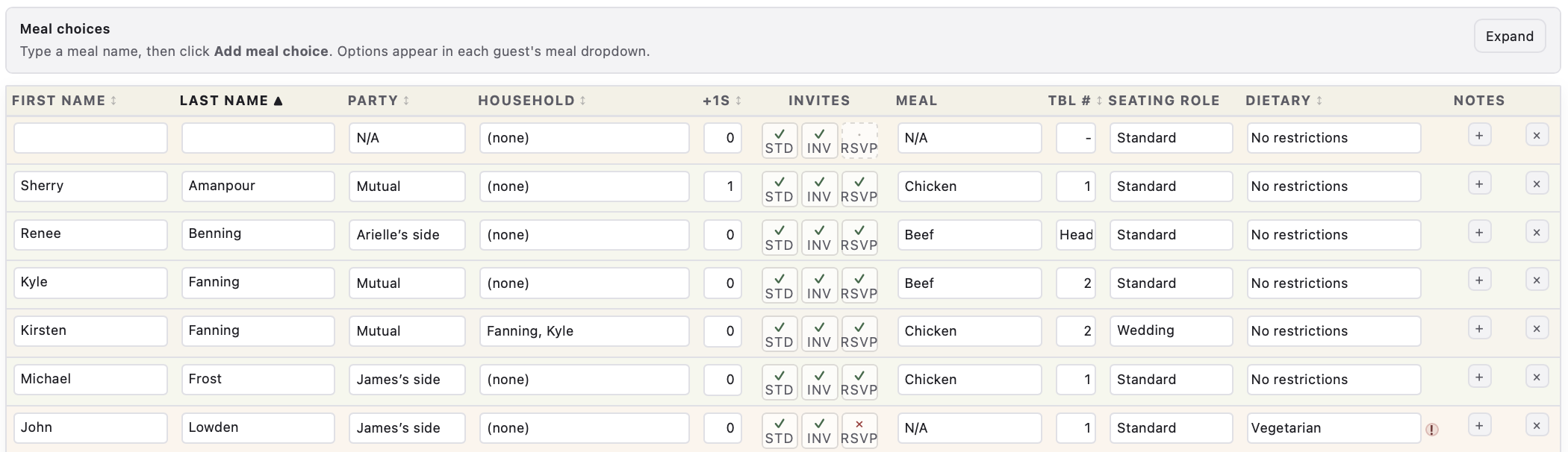
My Wedding Dashboard gives you one place where every guest detail lives: RSVPs, meal picks, dietary needs, household connections, plus-ones, invite status, table assignments. Email guests a secure link to collect contact info and RSVPs electronically. Their replies update your list automatically. Filter by who hasn't responded. Sort by table. Export when your venue needs a headcount. Import when your stationer sends something back.
Nothing gets dropped. Nobody gets forgotten.
Invites, RSVPs, and contact by email
You should not have to chase replies in a group text or retype answers from fifty different emails into a spreadsheet.
From the guest list, send each person a secure personal link. Guests open a simple form on their phone: RSVP (attending, declined, or not sure yet), meal choice, dietary needs, phone, email, and mailing address. Plus-one counts and seating requests can ride along in the same submission.
Send one guest at a time with Request missing info, or use Email requests to batch everyone who still owes you a reply. Copy a link instead if you prefer to paste it into your own message. When they submit, their row updates in your dashboard. No manual entry.
Track Save the Date, formal invite, and RSVP status in the Invites column while you follow up. Your Dashboard RSVP snapshot stays in sync so you always know your confirmed headcount.
Seating plan
Seating is really about relationships, and you know things about your guests that no algorithm does.
Who can't sit near their ex. Which grandparents need to be close to the exit. Which table of college friends will make the whole room louder in the best way.
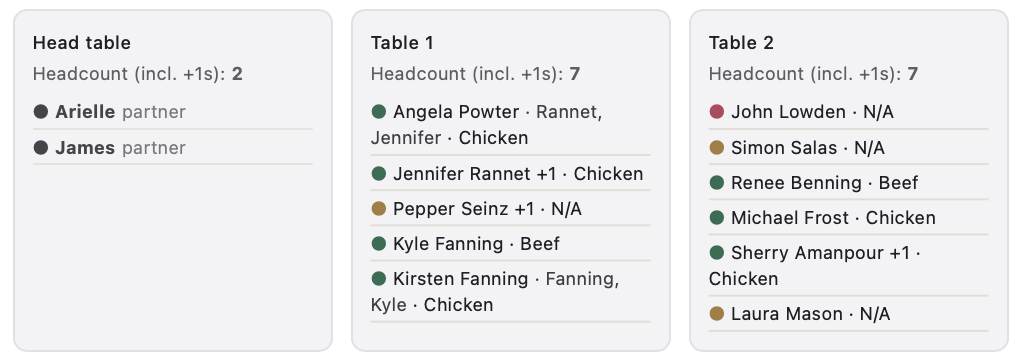
Start with auto-assign to get a working draft, then move people around until it feels right. Household members travel together by default. The visual layout shows you where everyone lands so you can trust the room before the day arrives.
Gifts and thanks
The wedding ends. The gratitude doesn't have to rush.
In the weeks after, when you're back from the honeymoon and the cards are in a pile somewhere, this is where you come back to. Log each gift, note the story behind it if you want to, and mark thank-you notes as they go out one by one.
The dashboard tells you how many are still waiting. Not to pressure you. Just so you never lose track of the people who showed up for you.
From the first RSVP to the last thank-you note, every person who matters to you, tracked in one place.
Guest list FAQ
RSVP, invites, and email requests
- Can I email guests to collect RSVPs and contact information?
- Yes. From the guest list, send each guest a secure personal link by email or copy the link into your own message. Guests submit RSVP, meal choice, dietary needs, phone, email, and mailing address on a mobile-friendly form. Their answers update the guest row automatically. See Invites, RSVPs, and contact by email above.
- What does the guest receive when I email a request?
- They get a personalized email with your note and a button to a secure form. The form collects contact info, mailing address, RSVP, plus-one count, meal and dietary choices, and optional seating notes. You can preview the form before sending.
- How do I keep track of who has RSVPed to my wedding?
- The RSVP snapshot on the Dashboard pulls directly from your guest list and breaks responses into three buckets: attending, pending, and declined, so you always know your confirmed headcount at a glance.
- Can I see how many guests have not responded yet?
- Absolutely. The pending count updates in real time, which makes it easy to follow up with guests who have not replied, with no spreadsheet hunting.
Guest list basics
- How do I manage wedding guests in MyWeddingDashboard?
- Use the Guest list table for each person or household row: name fields, party label, household grouping, plus-one counts, Save The Date and invite mailing status, RSVP, meal pick from the choices you define, optional table assignment text, dietary restriction and details, and delete when needed. Email guests a secure link to collect phone, email, mailing address, RSVP, and meal choice electronically. Use Email requests for bulk sends or Request missing info for one guest at a time. Filter by name, sort columns, export or import CSV, and set a global RSVP by date that appears above the table.
- Where does seating go if this is the guest manager?
- The guest list has a table field for quick seat notes or codes. The Seating plan section above covers table-building when you are ready to design the full chart.
Seating plan
- What does the wedding seating chart tool include?
- The Seating Plan tab includes drag-and-drop assignment from an Unassigned list into table cards, Add table, Auto-assign unseated guests, Reset assignments, venue max capacity, and universal guests-per-table capacity. The summary groups guests by table and shows RSVP color state.
- How do I make a wedding seating chart when RSVPs change?
- Move guests between tables by drag and drop, or unseat and reseat quickly. Household-linked guests move together to keep connected parties at one table when possible. Capacity limits are applied during assignment.
- Can I share the seating plan with my venue or coordinator?
- Yes. Use the Seating Plan summary and print controls to share a clear table-by-table view with your venue and coordinator.
Gifts and thanks
- What counts toward the Dashboard thank-you number?
- Rows that have both a sender and a gift description, with thank-you still set to Pending, match the counter logic in the live planner.
- Does it connect to an online wedding registry?
- There is no live store sync. Treat it as a wedding registry and gift manager notebook inside your dashboard file: copy items in from any retailer or spreadsheet so every thank-you line matches what actually arrived.
- How do I track wedding gifts and thank-you notes in one place?
- The thank-you notes widget on the Dashboard logs every gift you receive and lets you mark when the corresponding note has been sent, so nothing gets forgotten and no guest feels overlooked.